


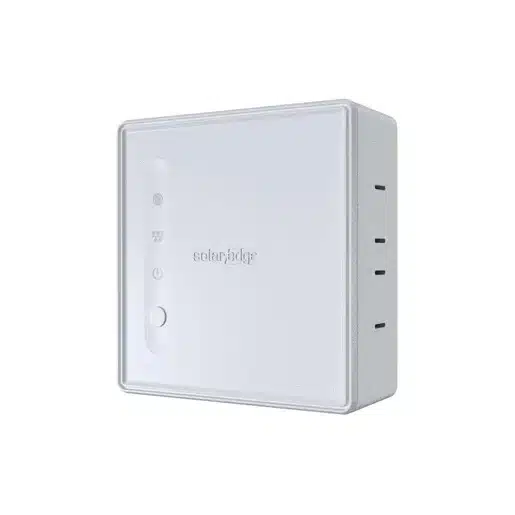
SolarEdge ONE Controller
SKU: 233996
€743.80 Original price was: €743.80.€471.07Current price is: €471.07. (20% BTW)
The SolarEdge ONE Controller is the smart hub of the SolarEdge Home ecosystem. It links your SolarEdge system to selected heat pumps (EEBUS) and EV chargers (OCPP 1.6), so that your PV surplus is automatically sent to these consumers and your energy bill is reduced.
The controller is powered via USB-C, communicates via WiFi and Ethernet and is commissioned using the SolarEdge Go app. As the owner, you manage everything via mySolarEdge, with real-time monitoring and powerful automations.
DatasheetMPN: SEM-MNG-WBTE-H0-00
Bezorging op Thursday 9 April — voor €8.41 verzonden (met 21% btw).
2 in stock (can be backordered)
SolarEdge ONE Controller – the smart director of your energy consumption
The SolarEdge ONE Controller (model LCNT, part number SEM-MNG-WBTE-H0-00) is the smart hub that connects your SolarEdge Home system to third-party devices such as EV chargers and heat pumps. The controller ensures that your solar power, grid power and consumers are optimally matched, so you use more of your own solar power, lower your energy costs and reduce your carbon footprint.
It is powered via USB-C, communicates via WiFi and Ethernet and supports EEBUS (for heat pumps) and OCPP 1.6 (for EV chargers). You do commissioning with the SolarEdge Go app; as a system owner, you manage everything via mySolarEdge with real-time monitoring and automations.
What does the SolarEdge ONE Controller do exactly?
- Links SolarEdge to third-party devices – such as selected heat pumps and EV chargers.
- Sends PV surplus to consumers – instead of feed-in, your extra solar power goes to your car or heat pump.
- Limits grid leakage and peaks – through smart control of large consumers.
- Supports automations – set rules such as “charge car only above X kW PV surplus” or “heat extra when electricity price is low”.
- Gives insight into consumption – via mySolarEdge you can see what is happening per device.
Designed as part of the SolarEdge Home ecosystem, the ONE Controller is a great starting point for anyone looking to expand their installation towards full smart energy management.
Integrations: heat pump & EV charger
- Heat pump (EEBUS)
Using the EEBUS protocol, the ONE Controller can control selected heat pumps. Consider functions such as:- additional heating if there is a lot of PV surplus (buffer in floor heating or boiler),
- switching off or modulating back at high grid load,
- smart response to dynamic tariffs.
- EV chargers (OCPP 1.6)
For compatible OCPP 1.6 EV chargers, the ONE Controller acts as a “brain” that:- enables PV surplus charging,
- limits charging capacity in case of limited home connection,
- can schedule and prioritise charging sessions.
Important: not every heat pump or EV charger works automatically. SolarEdge publishes a compatibility list; always check if your device is supported.
Key features SolarEdge ONE Controller
- Model: LCNT
- Item number: SEM-MNG-WBTE-H0-00
- Application: residential Europe, part of SolarEdge Home
- Purpose: optimise energy management for selected third-party integrations (heat pumps, EV chargers, etc.)
- Commissioning: via SolarEdge Go app
- Management by owner: via mySolarEdge app (monitoring, automation, system configuration)
- Third-party communication devices: EEBUS (heat pumps), OCPP 1.6 (EV chargers)
Technical specifications
Power supply
- DC voltage: 5 V
- Max. current: 3 A
- Connector: USB Type-C
- External power supply: 100-240 V AC, 50/60 Hz, 0.4 A in; 5 V DC, 3 A, max 15 W out
- Rated power consumption: 1-1.5 W
- Maximum consumption: 7 W
Communication
- WiFi: 2.4 GHz (2412-2484 MHz), 20 MHz bandwidth, 802.11b/g/n
- Ethernet: RJ45, 10/100/1000 Mbps
- Product control protocols: EEBUS (heat pumps), OCPP 1.6 (EV chargers)
Installation & environment
- Dimensions (h × w × d): 100 × 97 × 45 mm
- Weight: 185 g
- Operating temperature: -10 °C to +50 °C
- Storage temperature: -20 °C to +60 °C
- Relative humidity: 0-90 % (non-condensing up to 40 °C, decreasing linearly to 50 % at 55 °C)
- Protection category: IP20 – for indoor use only
- Mounting: wall/mounting mounting
- Hardware guarantee: 2 years
Standards & safety
- Safety: EN 62368-1
- EMC: EN 55032 class B, EN 55035, EN 61000-3-2, EN 61000-3-3, EN 301 489-1 class B, EN 301 489-3, EN 301 489-17 class B
- Radio: EN 300 328, EN 300 220
- RF exposure: EN 62311
Installation tips SolarEdge ONE Controller
- 1. Place it centrally and dry
Mount the controller indoors, preferably near your router or switch for a stable Ethernet or WiFi connection. IP20 means: do not hang it in damp rooms or outdoors. - 2. Preferably use wired network
WiFi is convenient, but for critical control (heat pump, EV charger), Ethernet is the most reliable option. So run a UTP cable to the controller whenever possible. - 3. Check compatibility of your devices
Not every EV charger or heat pump with EEBUS/OCPP works automatically. Check in advance in the SolarEdge compatibility list whether your type is actually supported. - 4. Use the SolarEdge Go app for commissioning
During initial commissioning, use the SolarEdge Go app to go through the steps to connect the controller to your SolarEdge system and add devices. - 5. Set up automations in mySolarEdge
Once everything is online, you can set up automations in the mySolarEdge app, for example:- EV charging only when PV surplus above X kW,
- run heat pump extra when there is a lot of sun,
- limit consumption when you go towards your grid import limit.
- 6. Think about the future
Even if you don’t have a heat pump or external EV charger now, you can already place the ONE Controller as a base. Later, simply connect additional devices to it.
Buy SolarEdge ONE Controller from Radiant Green
The SolarEdge ONE Controller turns your PV installation into a truly smart energy system. Instead of just panels and an inverter, you will soon be tuning your heat pump, EV charger and other large consumers to your own solar power and (dynamic) power prices.
Do you doubt whether your heat pump or EV charger is compatible, or where best to hang the controller? Send us an overview of your current installation (including type plates) and a picture of your meter box, and we will help you think about the ideal set-up.
Datasheet| Merk | Solaredge |
|---|
